AGIL Zeit 5.0.
Von Grund auf neu entwickelt.
Mit neuer technischer Basis, moderner Oberfläche und vielen Verbesserungen für den täglichen Einsatz. Vorgestellt am 23. Juni 2026 beim Tag der Personaldienstleister in Berlin.
Der KI-Assistent
Fragen Sie einfach. AGIL Zeit findet die passenden Daten.
Bisher hieß Suchen: die richtige Maske finden, drei Filter setzen, die Liste exportieren. Mit dem KI-Assistenten können Sie nun Ihre Suche in eigenen Worten formulieren. AGIL Zeit durchsucht die hinterlegten Daten und zeigt Ihnen die passenden Ergebnisse direkt an.
Mit Folgefragen können Sie die Ergebnisse weiter eingrenzen. Auch Arbeitsschritte lassen sich vorbereiten – ausgeführt werden sie erst nach Ihrer Prüfung und Freigabe.
- Fragen per Texteingabe oder Spracheingabe.
- Aktionen werden nie ohne Ihre Freigabe ausgeführt, jede Freigabe steht im Protokoll.
- Der KI-Assistent arbeitet mit Ihrer AGIL-Datenbank. Für die KI-Verarbeitung können neben Ihrer Frage auch benötigte Kontextdaten und ausgewählte Ergebnisse an den angebundenen KI-Dienst übermittelt werden. Der Umfang hängt von Funktion und Konfiguration ab.
Ein Start, viele Fenster
Schluss mit dem Doppelstart.
Das Telefon klingelt, ein Einsatzbetrieb braucht morgen früh drei Leute. Kunde nachsehen, Mitarbeiter suchen, Auftrag anlegen, alles gleichzeitig. Früher lief AGIL Zeit dafür zweimal oder dreimal.
In 5.0 sind die Formulare entkoppelt: Mitarbeiter, Kunden und Aufträge können gleichzeitig geöffnet und bearbeitet werden. Dafür muss AGIL Zeit nicht mehrmals gestartet werden.
Die einzelnen Fenster lassen sich frei anordnen und auch auf mehrere Bildschirme verteilen. So haben Sie die Informationen gleichzeitig im Blick und können direkt zwischen den Bereichen wechseln.
Warum wir die Formulare entkoppelt habenDas Dashboard
Ein Dashboard. Sechs Kacheln. Keine Auswertung, die erst gebaut werden muss.
Wir haben Disponentinnen und Disponenten gefragt, was sie sich von einer neuen Version wünschen. Die häufigste Antwort war kein Spezialfeature, sondern ein Satz: ich will auf einen Blick sehen, was los ist.
Darum öffnet AGIL Zeit 5.0 mit einem Dashboard. Die Zahlen stehen da, wenn Sie die Software starten:
- Erinnerungen: fällig und überfällig, davon Ihre eigenen
- Bewerberflow: vom Posteingang bis zur Einstellung, mit Quote
- Abwesenheiten heute: krank, Urlaub, sonstige, anwesend
- Mitarbeiter im Einsatz: wer gerade auf einem Auftrag ist
- Auslaufende Aufträge: was in den nächsten vierzehn Tagen endet
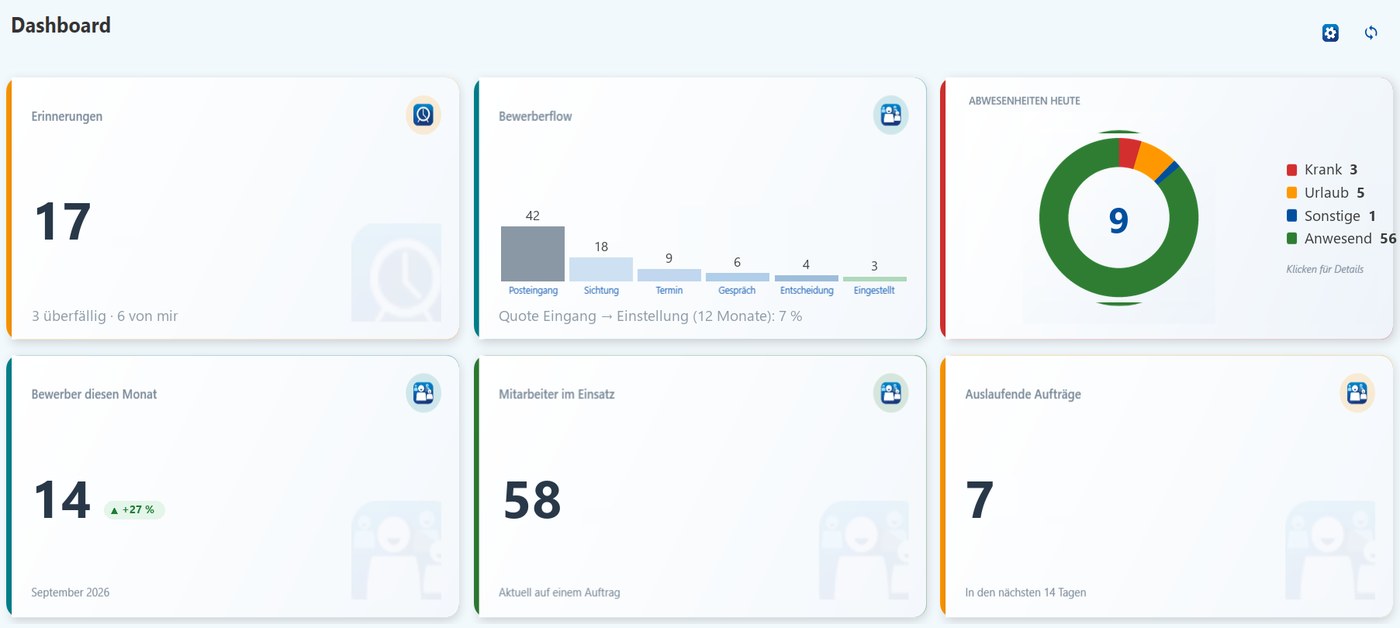
Ausschnitt des Dashboards, Beispieldaten.
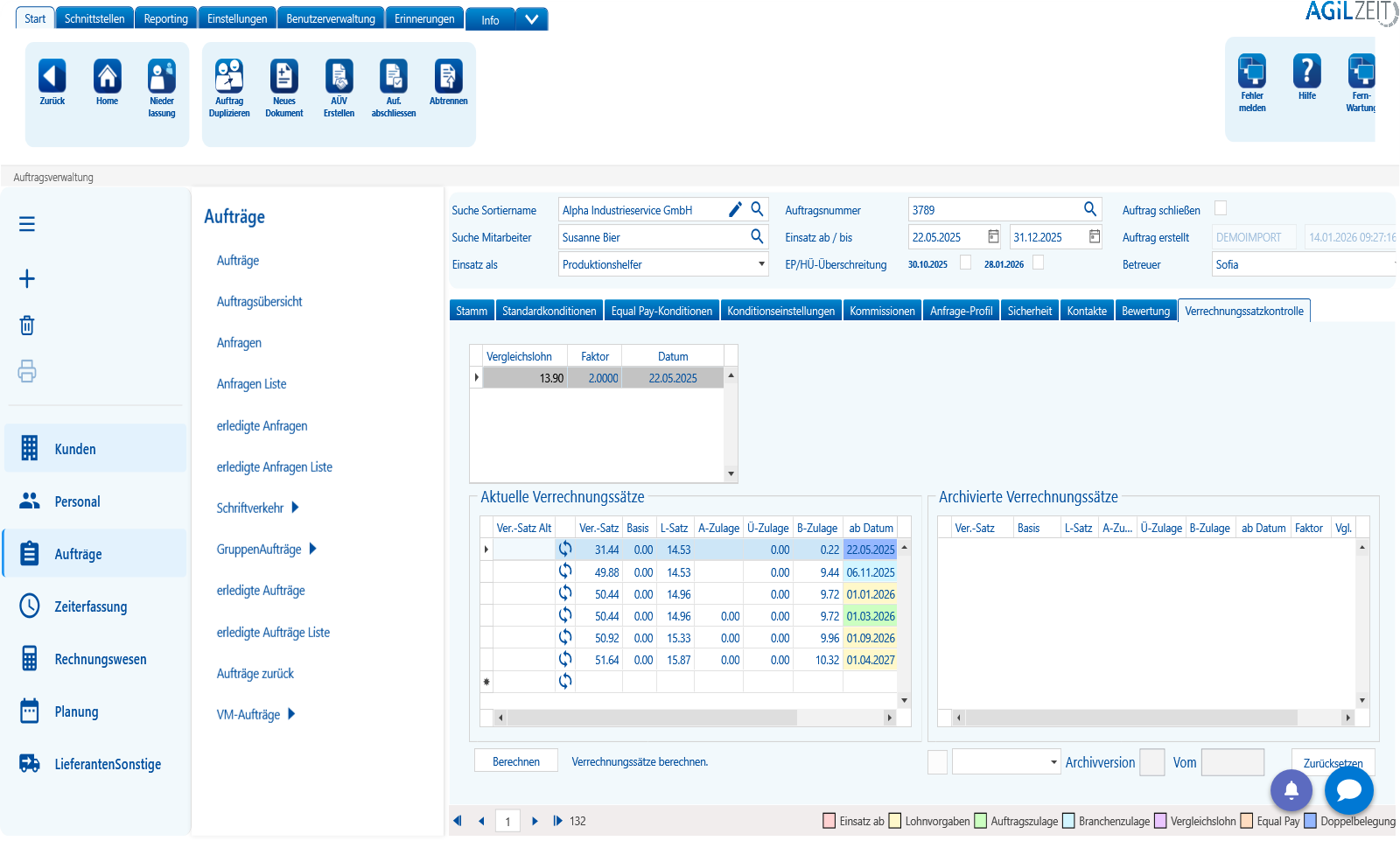
Die Auftragsverwaltung in 5.0, Demodaten.
Die Oberfläche
Klar, hell, und in Ihrer Schriftgröße.
Blau-Weiß statt Grau, Kacheln statt Formularwüste, die Navigation links immer an derselben Stelle. Wer AGIL Zeit kennt, findet sich sofort zurecht. Wer neu ist, braucht keine Schulung, um die erste Maske zu verstehen.
- Schriftgröße mit Strg + Plus und Minus, für die ganze Anwendung.
- Oberfläche auf Deutsch oder Englisch, Wechsel ohne Neustart.
- Lädt im Hintergrund, die Maske bleibt bedienbar.
Die KI-Funktionen
KI-Unterstützung direkt in AGIL Zeit.
Jeden Assistenten schaltet Ihr Administrator je Benutzer frei, mit getrennter Sicht auf Umsätze, Löhne und Margen. Vorschläge bleiben Vorschläge, bis Sie freigeben. Die KI-Funktionen sind optional und werden zu Ihrem Paket dazugebucht.
KI-Assistent
Fragen Sie in eigenen Worten nach Informationen aus Ihren Daten und bereiten Sie Arbeitsschritte direkt in AGIL Zeit vor.
Spracheingabe
Fragen einfach einsprechen statt eintippen.
Mitarbeiter-Matching
Passende Mitarbeiter anhand von Qualifikation, Verfügbarkeit und weiteren Kriterien finden.
Datenprüfung
Zeiterfassungsdaten auf Fehler und Auffälligkeiten prüfen, bevor sie weiterverarbeitet werden.
Bewerber-KI
Unterstützt bei Suchprofilen, Bewerbertexten und der Zuordnung passender Bewerber zu Aufträgen.
AGIL TIS
Stundenzettel automatisch auslesen und die erkannten Daten zur weiteren Verarbeitung in AGIL Zeit bereitstellen.
Sie arbeiten bereits mit AGIL Zeit 4?
AGIL Zeit 5.0 kann parallel zur Version 4 mit derselben Datenbank genutzt werden. Sie entscheiden, wann Sie umsteigen.
Pakete und PreiseSie wechseln von einer anderen Software?
Wir unterstützen Sie bei Datenübernahme, Schulung und dem Start mit AGIL Zeit.
So läuft der UmstiegLernen Sie AGIL Zeit 5.0 kennen.
Wir zeigen Ihnen AGIL Zeit 5.0 anhand Ihrer Anforderungen und beantworten Ihre Fragen.